%matplotlib inlineimport matplotlib.pyplot as plt# dataimport numpy as npimport pandas as pd# usefulimport re, glob, osfrom tqdm.auto import tqdmfrom pathlib import Path# miscfrom scipy.spatial.distance import pdistnp.random.seed(3141519)
Motivation
Packing circle is a common problem shows up in molecular modeling. For example, when we arrange lipid molecules in membrane bilayer, we are essentially packing circular areas in 2D box. One could use Monte-carlo simulation appraoch to pack these molecules, but it is a time consuming and compute intensive. Let’s explore algorithmic ways to arrange these circles in 2D area, which will be an efficient approach.
Here, I’m going to follow the algorithm proposed by Weixin Wang. In short, the algorithm attempt to add externally tangential circles to two circles that are already added. The algorithm uses so-called “front-chain”, which holds the list of circles at the outer most edges and attempt to extend the chain.
Initial Circles
import mathn_circles =1000radii = [np.random.randint(1, 3) for i inrange(n_circles)]class Circle:def__init__(self, x, y, r):self.x = xself.y = yself.r = r@propertydef center(self):return (self.x, self.y)
For this excercise, let’s try to add 100 circles with random radii. We defined a simple Circle class to hold information about circle.
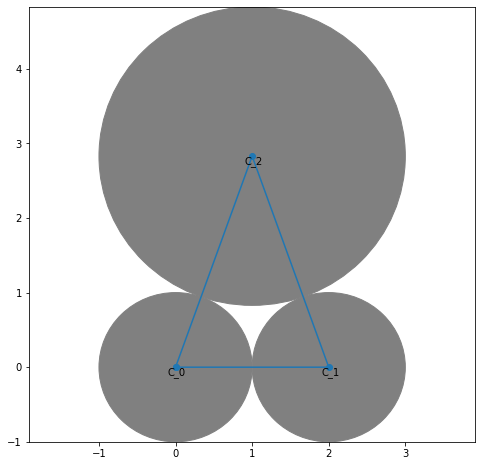
First thing we will have to do is to lay out three initial circles. The first two circles are straightforward; first cicles is placed on the origin (0, 0) and the second circles is placed on the X-axis at (r_0 + r_1, 0).
The third circle is placed as tangent to the first two circles. To find the center of the third circle, we need to solve the systems of equation using the following relationship; (x_3, y_3) is distance of (r_1 + r_3) from the center of the first circle and (x_3, y_3) is distance of (r_2 + r_3) from the center of the second circle.
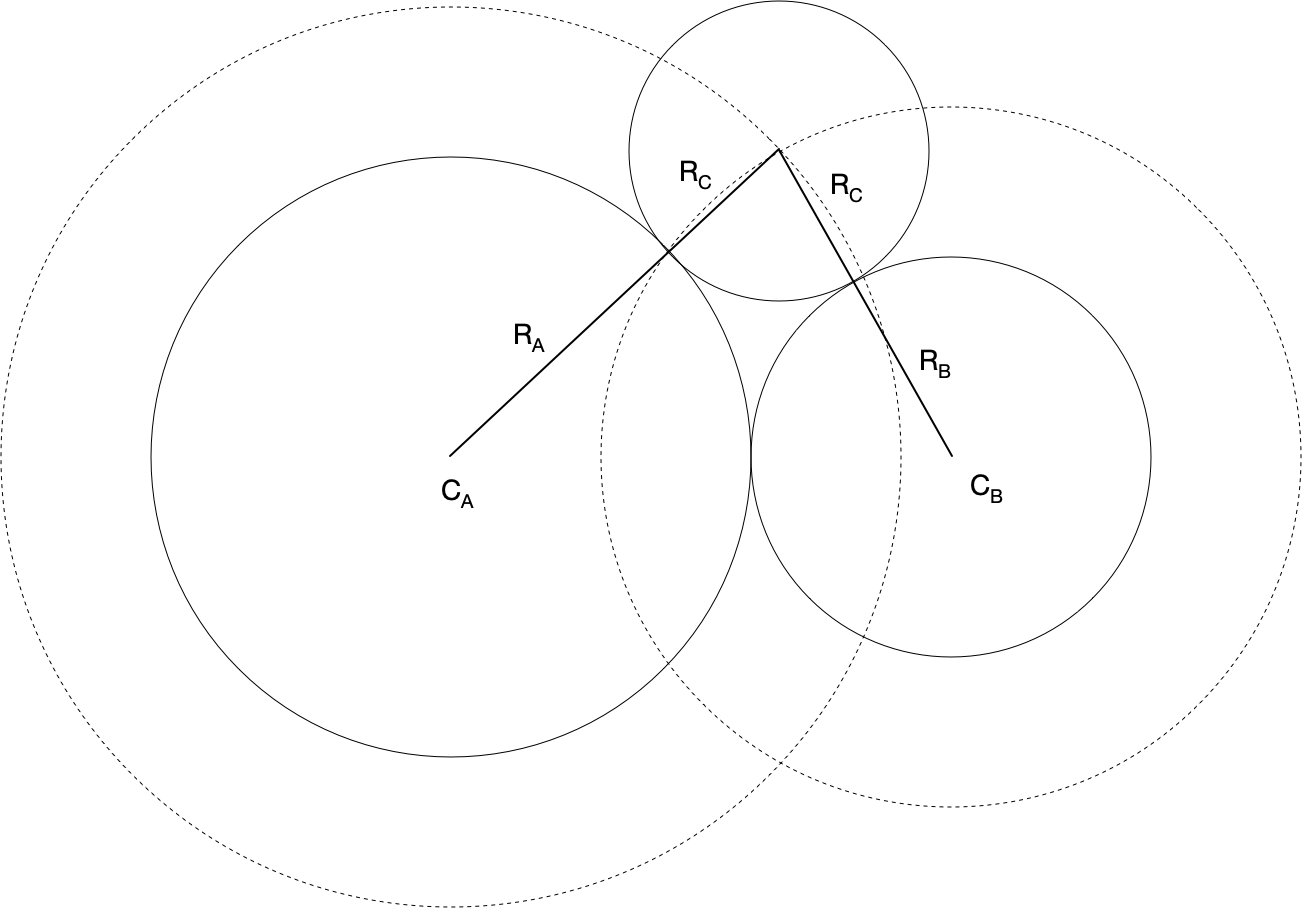
Analytically, an externally tangent circle, C_C to the two circles (tangent to each other), C_A and C_B, can be found by finding an intersection point of two circles having same center as C_A and C_B but larger radii r_A + r_C and r_B + r_C.
feature
The detailed derivation on how to find the intersection points can be found in Paul Bourke’s note: http://paulbourke.net/geometry/circlesphere/
from math import sqrtdef tangent_circle(c0, c1, r): r0 = c0.r + r r1 = c1.r + r x0, y0 = c0.center x1, y1 = c1.center d = sqrt((x0 - x1)**2+ (y0 - y1)**2) a = (r0*r0 - r1*r1 + d*d) / (2* d) h = sqrt(r0*r0 - a*a) x2 = x0 + a * (x1 - x0) / d y2 = y0 + a * (y1 - y0) / d p3 = ( (x2 + h * (y1 - y0) / d, y2 - h * (x1 - x0) / d), (x2 - h * (y1 - y0) / d, y2 + h * (x1 - x0) / d) ) theta1 = math.atan2(p3[0][1]-y0, p3[0][0]-x0) theta2 = math.atan2(p3[1][1]-y0, p3[1][0]-x0)if theta2 > theta1: p3 = (p3[1], p3[0])return p3
Let’s add more circles and update front-chain according to the algorithm described in paper. Following is quoted verbatim from the paper.
Calculate the center of C_i according to the radius r_i and the tangency of circle C_i to C_m and C_n. The circles C_m and C_n are the circles next to each other in the front-chain.
Search the front-chain and find out the circle C_j intersecting with C_i.
If C_i does not intersect with any circle C_j in the front-chain, C_i is added to the front-chain directly, and packing C_i is terminated. The front-chain is updated to include C_i, such that \{\cdots C_m \leftrightarrow C_n \cdots\} becomes \{\cdots C_m \leftrightarrow C_i \leftrightarrow C_n \cdots\}
If C_i intersects with C_j, and C_j is a circle after C_n on the front-chain, then the segments from C_m to C_j have to be deleted from the front-chain and the circle C_n is replaced by C_j. Go to step 1. A new position of C_i tangent to the two circles C_m and C_n will be calculated.
If C_i intersects with C_j, and C_j is a circle before C_m on the front-chain, then the segments from C_j to C_m have to be deleted from the front-chain and the circle C_m is replaced by C_j. Go to step 1. A new position of C_i tangent to the two circles C_m and C_n will be calculated.
Code
def circle_intersect(circle1, circle2, test_only=False):""" Intersection points of two circles using the construction of triangles as proposed by Paul Bourke, 1997. http://paulbourke.net/geometry/circlesphere/ """ x0, y0 = circle1.x, circle1.y x1, y1 = circle2.x, circle2.y r0 = circle1.r r1 = circle2.r d = sqrt((x0 - x1)**2+ (y0 - y1)**2)if d > (r0 + r1):return-1, None# do not intersectelif d <=abs(r1 - r0):return-2, None# one circle is contained within the circleif d == (r0 + r1) or d == (r0 - r1): CASE =1else: CASE =2if test_only:return CASE, None a = (r0*r0 - r1*r1 + d*d) / (2* d) h = sqrt(r0*r0 - a*a) x2 = x0 + a * (x1 - x0) / d y2 = y0 + a * (y1 - y0) / d I1 = (x2 + h * (y1 - y0) / d, y2 - h * (x1 - x0) / d)if CASE ==1:return CASE, (I1,) I2 = (x2 - h * (y1 - y0) / d, y2 + h * (x1 - x0) / d) theta1 = math.degrees(math.atan2(I1[1]-y0, I1[0]-x0)) theta2 = math.degrees(math.atan2(I2[1]-y0, I2[0]-x0))if theta2 > theta1: I1, I2 = I2, I1return CASE, (I1, I2)def tangent_circle_center(circle1, circle2, radius3):""" find center of circle tangent to both circle1 and circle2 circle1 and circle2 is assumed to be tangent """ x0, y0 = circle1.x, circle1.y x1, y1 = circle2.x, circle2.y r0 = circle1.r + radius3 r1 = circle2.r + radius3 d = sqrt((x0 - x1)**2+ (y0 - y1)**2) a = (r0*r0 - r1*r1 + d*d) / (2* d) h = sqrt(r0*r0 - a*a) x2 = x0 + a * (x1 - x0) / d y2 = y0 + a * (y1 - y0) / d I1 = (x2 + h * (y1 - y0) / d, y2 - h * (x1 - x0) / d) I2 = (x2 - h * (y1 - y0) / d, y2 + h * (x1 - x0) / d) torque = (x1-x0)*(I1[1]-y0)-(y1-y0)*(I1[0]-x0)if torque >0: I1, I2 = I2, I1return I1, I2
def add_circle(circles, chain, index, radius): c_m = circles[chain[index]] c_n = circles[chain[index+1]] p3 = tangent_circle_center(c_m, c_n, radius) c_i = Circle(p3[0][0], p3[0][1], radius) update =Falsefor i, idx inenumerate(chain[:-1]):if i == index or i == index+1:continueif i ==0and index +1==len(chain) -1:continue c_j = circles[idx] CASE, _ = circle_intersect(c_i, c_j, test_only=True)if CASE >1: distance_left = index - i if index - i >0else index - i +len(chain) -1 distance_right = i - index -1if i - index -1>0else i - index -1+len(chain) -1 left = distance_left < distance_right#print(left, chain, chain[index], chain[i], i, index)if left:if i < index: chain = chain[:i+1] + chain[index+1:]else: chain = chain[i:] + chain[index+1:i] + [chain[i]]else:if i > index: chain = chain[:index+1] + chain[i:]else: chain = chain[i:index+1] + [chain[i]]if index >len(chain) -2: index =0return add_circle(circles, chain, index, radius) circles.append(c_i) chain = chain[:index+1] + [len(circles)-1] + chain[index+1:] return circles, chain
Now we can repeatedly call above function to add circles to our
c3 = Circle(p3[0][0], p3[0][1], radii[2])circles = [c1, c2, c3]chain = [0, 1, 2, 0]index =0for i inrange(100): circles, chain = add_circle(circles, chain, index, radii[3+ i]) index +=1if index >len(chain) -2: index =0
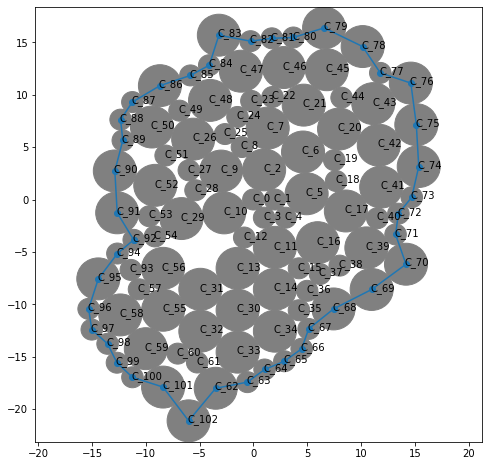
draw_circles(circles, chain, show_label=True)
And here’s a little animation of the process.
Code
"""A simple example of an animated plot"""import numpy as npimport matplotlib.pyplot as pltimport matplotlib.animation as animationfig, ax = plt.subplots(figsize=(8, 8)) # note we must use plt.subplots, not plt.subplotxmin, xmax =999, -999ymin, ymax =999, -999line, = ax.plot([], [])c3 = Circle(p3[0][0], p3[0][1], radii[2])circles = [c1, c2, c3]chain = [0, 1, 2, 0]index =0ax.set_xlim(-20, 20)ax.set_ylim(-20, 20)def animate(index):global circles, chainif index >len(chain) -2: index =0 circles, chain = add_circle(circles, chain, index, radii[3+ index])#line.set_xdata(circles[-1].x)#line.set_ydata(circles[-1].y) patch = plt.Circle(circles[-1].center, circles[-1].r, color='gray') ax.add_patch(patch) x = [] y = []for idx in chain: x.append(circles[idx].x) y.append(circles[idx].y) x.append(circles[chain[0]].x) y.append(circles[chain[0]].y) line.set_data(x, y)return line,#Init only required for blitting to give a clean slate.def init(): x = [] y = []for i inrange(3): patch = plt.Circle(circles[i].center, circles[i].r, color='gray') ax.add_patch(patch) x.append(circles[i].x) y.append(circles[i].y) x.append(circles[0].x) y.append(circles[0].y) line.set_data(x, y)return line,#ani = animation.FuncAnimation(fig, animate, np.arange(1, 200), init_func=init,# interval=25, blit=False)ani = animation.FuncAnimation(fig, animate, np.arange(1, 100), interval=350, init_func=init, blit=True)plt.close()from IPython.display import HTMLHTML(ani.to_html5_video())